Blog
A Garmin GNS 430 you can fly in a browser tab
I needed GNS 430 practice without renting a plane by the hour. The box is GPS, nav radio and comm radio in one unit: a 240×128 pixel screen, buttons, concentric knobs. Muscle memory — which knob, which page, how many clicks.
So I built one in a browser tab. A simulated aircraft follows real flight paths while you work the box.

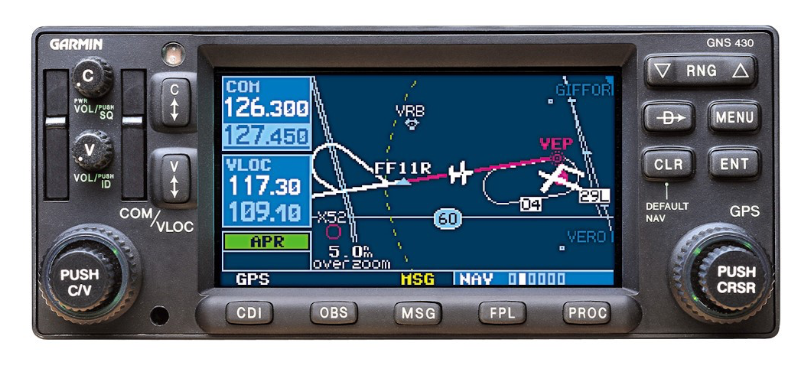
Screen
One canvas, 240×128 logical pixels, integer-scaled so the pixels stay crisp, with a hand-authored bitmap font. The whole thing redraws every frame from state. No DOM, no widgets — a tiny framebuffer API that the page renderers draw into.
Knobs
The bezel is a photograph of the real unit. Invisible hit targets sit on top of it, measured in percentages against the source image.
Scroll the outer ring and you turn the large knob. Scroll the inner cap and you turn the small one. Click the cap and you push it. Large knob picks the page group. Small knob picks the page within it.
Features
COM and VLOC tuning with standby-and-swap, Direct-To, multi-leg flight plans (FPL) edited on the device itself, the moving map, SIDs and STARs, OBS mode and holds, and GPS approaches that follow the Pilot's Guide.
There's an ILS too — localizer and glideslope needles, the automatic GPS→VLOC switch as you intercept, and an autopilot that will couple to the localizer. Wind is configurable. Time can be scaled. Every tricky behaviour is a named pure function with a test behind it.
CDI
Full-scale deflection is 5.0 NM en route, tightens to 1.0 NM within 30 NM of the destination, and ramps to 0.3 NM starting two miles outside the final approach fix — only with an approach actually active.
The simulator arms and ramps it the same way. It holds 0.3 NM from the FAF to the missed approach point, drops into SUSP there instead of sequencing onward, and will fly you the missed approach and the published hold.
Academy
Fourteen lessons that watch what you do, give hints when you stall, and save your progress. Two longer scenario flights: an ILS arrival, and an RNAV approach flown via vectors to final, with per-phase scoring, live error detection and an end-of-run debrief.
Lessons and free-flight setups are shareable as links. An instructor can hand a student a URL that opens the box at a specific aircraft position, wind, flight plan and time scale.
Data
Waypoints and procedures come from the FAA's public-domain CIFP (the ARINC 424 dataset). Airport comm frequencies are enriched from the NASR extract. A build script parses a cycle, shards it into 5°×5° tiles plus per-airport procedure files, and publishes them behind an atomic pointer file. A new AIRAC cycle means re-running a script — no commit, no redeploy. The client fetches tiles around the aircraft as it flies. If anything fails it falls back to a small Pacific Northwest dataset baked into the page.
Procedures using leg types the simulator doesn't support — radius-to-fix arcs, mostly — are counted and reported as unsupported rather than approximated. Nearly 4,000 of them on the current cycle.
Training-only waypoints invented for the seed lessons are named in a pattern the FAA never issues. An audit found that friendly invented names had collided with real published fixes — one of them a genuine intersection eighty miles away, sitting on a real arrival.
Try it
Scroll the knobs, punch in a Direct-To, fly an approach: lucaslongo.com/pages/gns430. The on-page How to fly it section covers the controls if you've never touched one.
Training use only. Teaching model of the box, missing VNAV, terrain, fuel planning and the 530 variant.